
Inside OpenSquilla: Local LLM Routing & Hardcoded TDD for Indie Devs
01. The Pain Point: Using a Nobel Laureate to Do Elementary Arithmetic
Staring at a multi-hundred-dollar API bill at the end of the month is a sobering experience for any heavy AI user. When using tools like Claude Code, even the simplest requests would trigger a hard call to the flagship Opus model. The bill kept climbing, but deep down, every developer knew the truth: hiring a Nobel laureate to do elementary arithmetic is a massive waste of money. That’s exactly the anxiety that OpenSquilla cured.
02. The Good: Two Geek-Approved Highlights
Highlight 1: Nailing the Art of “Right Tool for the Right Job”
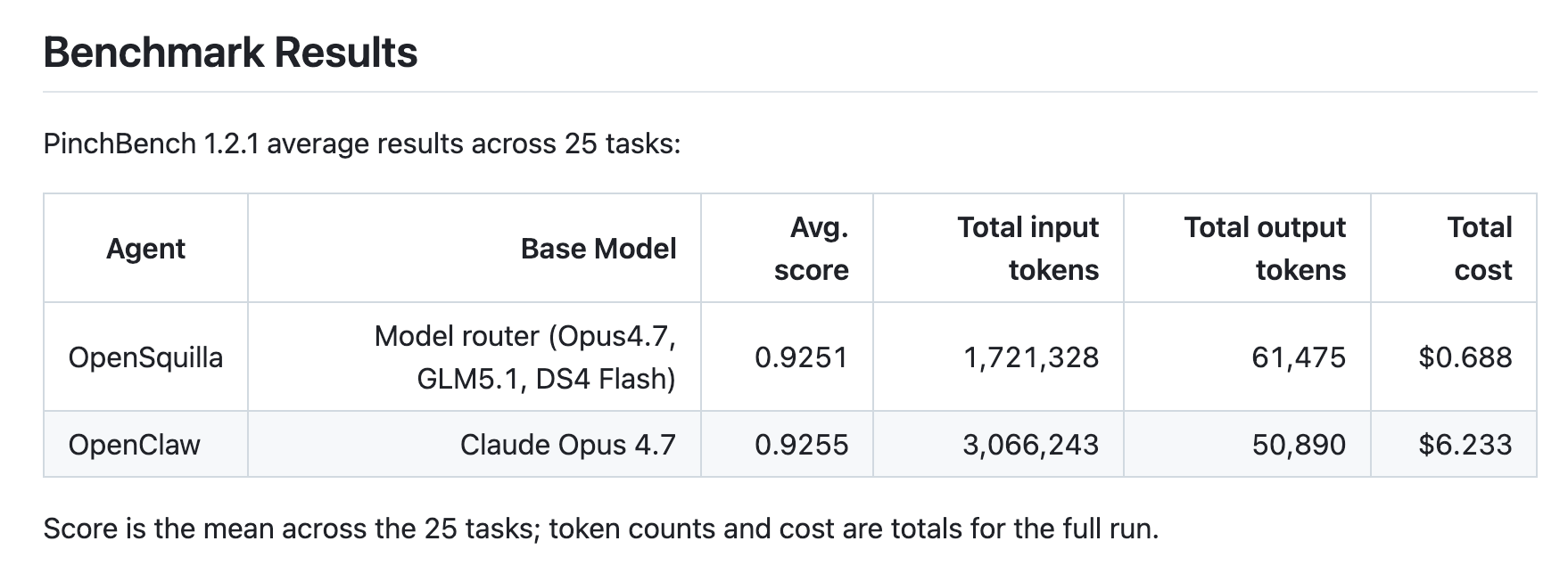
Unlike other tools that blindly chase the most powerful model, OpenSquilla uses its built-in SquillaRouter to run a local classifier and predict task complexity. For example, when asked to add a global exception filter to a NestJS project, it automatically routed the task to a local Ollama model. The whole process took just 50 seconds, burned about 8K tokens, and cost a mere $0.016. The same task, if forced through Opus, would have cost $0.38—a 23x difference. In PinchBench benchmarks, OpenSquilla delivered nearly identical quality to top-tier models for less than 10% of the budget. For independent devs, this kind of cost compression finally makes it safe to use AI for high-frequency tasks.
Highlight 2: Hardcoding TDD’s “Red-Green-Refactor” Loop into AI’s DNA
The Coding mode introduced in version 0.4.0 is a dream for anyone with code OCD. Instead of just spitting out code, the AI works in an isolated copy: it first writes a failing test (Red), then modifies the code to pass the test (Green), and finally runs the existing test suite to ensure nothing else broke (Refactor/Regression). It only hands over the work once all three gates are passed. This “no 100% score, no submission” mechanism has saved developers from multiple potential “fix A, break B” disasters and eliminated the need for manual code reviews.
03. The Bad: A No-Holds-Barred Rant
OpenSquilla is far from a perfect silver bullet. Some of its design choices create a palpable sense of friction in real-world workflows.
-
A Different Species Entirely: It’s nothing like Cursor or Claude Code, which are deeply embedded in your IDE. OpenSquilla is primarily a CLI and Web UI. If you’re heavily reliant on IDE plugins and used to summoning AI directly in your code editor, constantly switching windows to operate a CLI is a jarring experience.
-
The Friction of Manual Triggers: MetaSkills (meta-skill workflows) are powerful, but version 0.4.0 switched them from automatic to manual triggers (requiring the
/metacommand). While this prevents the AI from going rogue and gives control back to the user, it feels clunky at first for anyone accustomed to the “one prompt, fully automated” experience. -
Struggles with Long Contexts: In creative brainstorming tasks that rely heavily on long contexts, its cache hit rate drops. The cost-saving magic just isn’t as pronounced here as it is when handling structured data or standard code tasks.
04. The Verdict: Who Should Use It? Who Should Run?
Recommended For:
-
Independent full-stack developers and small teams who are extremely cost-sensitive.
-
Privacy-conscious users who already have local models deployed and demand high security.
OpenSquilla takes an engineering-first approach, turning Agents from flashy demos into reliable production tools. It lets you slash token costs by 90% without sacrificing delivery quality.
Check out the source code on GitHub: https://github.com/opensquilla/opensquilla
Steer Clear If:
-
You demand extreme autonomous agent planning capabilities.
-
You are a heavy editor user who can’t live without seamless IDE plugins.
-
You frequently handle highly complex cross-module architectural changes.
Its core strengths are “high cost-performance” and “deterministic delivery,” not infinite context windows or a buttery-smooth editor experience. In an era where AI tools are racing to the top in model benchmarks, OpenSquilla has chosen a pragmatic, geeky path: ignoring the model wars to focus entirely on optimizing the harness layer. And honestly? That’s pretty cool.
05. If you enjoyed this, you might also like:
-
I Tested Asana’s AI Chief of Staff: Here is Why It is Not the Brain You Think It Is
-
Drowning in User Feedback? Why BuildBetter is a Research Synthesizer, Not a Strategist
-
Raycast for Web Developers: Automate Your Workflow & Ditch the Mouse
A Quick Note:
The insights above are based on real-world usage and are for reference only. Your mileage may vary.
If you’ve had a similar experience or completely disagree.we’d love to hear from you: https://forms.gle/